This is part of a regular series of Google Apps updates that we post every couple of weeks. Look for the label “Google Apps highlights" and subscribe to the series. - Ed.It’s back-to-school season, and we’ve made Gmail, Google Docs, Calendar and Sites easier to use and more powerful for students and non-students alike—including some important accessibility improvements to help blind users be productive in our apps.
Multiple sign-in and other new preferences in Gmail for mobileOn Wednesday, we added some
helpful new features for people who use Gmail on a mobile browser. You can now sign in to more than one Gmail account at a time, and toggle between them easily from the account switcher menu at the bottom of the mobile inbox. This can be a good time saver if you have multiple accounts or share a mobile device with family members. Gmail for mobile also now enables you to set up mobile-specific email signatures and create vacation responders right from your phone to let people know when you won't be available by email.
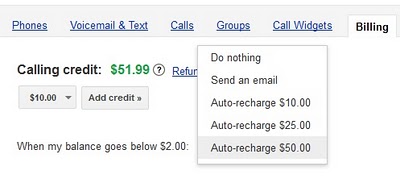
Calling credit auto-rechargeNow you can
automatically add international calling credits for phone calls in Gmail when your balance gets low. Just visit the "Billing" area of the Google Voice settings page and click "Add credit" to put your account on cruise control.
Allow people to comment but not edit in documentsSometimes, you might find yourself in situations when you’d like to share a document for feedback, but don’t want to make the document's content fully editable. The
comment-only level of access launched last week is a nice option for these scenarios. You can let others discuss and add their thoughts to your document—without allowing them to change your work. You can allow document comments from specific individuals or groups, from anyone belonging your organization or from the general public.
Format painter, Fusion Tables, drag & drop images and vertical cell mergeComment-only access isn't all that we've added to Google Docs over the last few weeks. Other
notable improvements include a text format painter in documents, which is a fast way to copy and paste font, size, color and other text styling. Spreadsheets now support vertically merged cells (in addition to horizontal merges). In drawings, you can drag images from your desktop to the drawing canvas, then continue editing your graphic. We also added Fusion Tables as a new document type in the documents list.
Fusion Tables are a powerful way to gather, visualize and collaborate on large data sets that might be unwieldy in a typical spreadsheet.
Fusion Table data visualized on an interactive map
Accessibility improvements in Google Calendar, Docs and SitesWe think technology can do a better job getting out of people’s way and helping you be more productive with less complexity and fewer frustrations. In this spirit, we’ve recently made a series of improvements to make our applications more accessible to blind users. We have more work to do, but Google
Calendar,
Docs and Sites now offer better support for screen readers and improved keyboard shortcuts. We hope these changes make our applications more useful to all users.
Who’s gone Google?Organizations are moving to Google Apps for a diverse set of reasons—including cost savings, streamlined teamwork and better mobile access. We’ve even started hearing from schools and businesses who have made the switch to
reduce their impact on the environment. No two organizations choose Google Apps for the exact same reasons, but in total, the momentum of Google Apps keeps growing.
We recently shared the news that
61 of the top 100 universities ranked by
U.S. News and World Report have gone Google. On the business side, there are now more than
4 million companies using Google Apps, and businesses are joining at a rate of over 5,000 per day. In all, there are more than 40 million users that regularly use Google Apps in their organizations.
I hope these product updates and customer stories help you and your organization get even more from Google Apps. For more details and the latest news, check out the
Google Apps Blog.
Posted by Jeremy Milo, Google Apps Marketing Manager
You have read this article Gmail /
Google Apps /
Google Calendar /
Google Docs
with the title
. You can bookmark this page URL https://rafaiblanco.blogspot.com/2011/09/google-apps-highlights-9232011.html. Thanks!